Reformation

Redesigned key Reformation app features – Favorites, Order History, In-App Support – to improve re-engagement, reduce friction in post-purchase flows, and support repeat purchasing in a sustainability-driven retail model.

Product Design & Case Study

Project Overview

Client: Reformation, sustainable, slow fashion
Industry: e-Commerce Apparel
Project Timeline: May 2023 – Oct 2023 & Aug 2025 – Nov 2025 (revisit)
My Role: UX/UI Designer, UX Researcher
Tools: Figma, FigJam, Maze, Notion, Qualtrics, Adobe XD

The Challenges & Purpose

In a consumer driven society, every brand has to bring its A-game when it comes to web and mobile applications and Reformation is no exception to this rule. Unfortunately, mobile browsers are particularly prone to lagging, crashing, and refreshing a page mid-interaction is practically a death sentence. The visual thread snaps, customers leave, and the intended task is shelved in limbo indefinitely. As the front-end designer, my goal is to create a mobile app capable of hosting Ref's impressive catalogue while expanding on features like saved products, order history, returns, and a curated collection algorithm.

This leaves a lot of frustrated customers who have to constantly refresh their browsers, find their liked products unsaved, or can’t even search up their order.

The Final Product

With a fully immersive app experience and thoughtful in-app notifications, users can say goodbye to buried inboxes and fragmented browsing. The app creates a seamless, end-to-end shopping journey – effortlessly guiding users from discovery to checkout, exchanges, and returns, all in one place. Shoppers never miss a new release, sustainability update, or restock, while features like favorites and saved lists allow them to revisit pieces intentionally. By centralizing the experience, the app reduces friction, encourages mindful purchasing, and reinforces Reformation’s commitment to both style and sustainability.

My Role & Responsibilities

As the sole Product Designer and UX Researcher, I led the end-to-end redesign of Reformation’s mobile and web experience – from user interviews and journey mapping to wireframing, prototyping, and usability testing. I created a fully interactive prototype that streamlined product discovery, favorites, checkout, and post-purchase flows, while introducing curated lists and saved styles to support intentional shopping. The overarching goal was to design an all-in-one experience that reduces friction across browsing, purchasing, exchanges, and returns – making it easier for users to shop thoughtfully while staying connected to Reformation’s values around sustainability and timeless style.

Duration & Tools

While this project began in late 2023, it has remained an evolving body of work – iterated over time to reflect my growth as a product designer. Each revision showcases how my design decisions matured alongside ongoing research, evolving best practices, and the development of scalable component libraries. Throughout the process, I used tools including Figma and FigJam for design and collaboration, hand sketching for early ideation, Notion for documentation, and Maze and Qualtrics for usability testing and insights.

The Design Process

Inch By Inch, It’s a Cinch!

As customary, chunking out my vision made my work load far more manageable and allowed me to approach my work with more clarity. While the design process is seldom linear, it serves as an intentional set of guardrails to help me stay grounded when my ideas begin to ricochet in a million different directions. In many ways, the design process has become the antidote to my thought spirals by channeling information overload into structure and my scattered bursts of inspiration into meaningful solutions.

Discovery 🪩

Research Methodologies

During the research phase, I started by identifying areas of weakness in the current interface before completing a competitive analysis of mid-to-high-end apparel brands and user interviews of moderate to avid Reformation shoppers against fellow brands. The goal is to identify the shoppers' pains and motivations, their reasoning behind choosing Ref versus other brands, and what features they desired for a seamless retail experience.

Examine Thyself 🔍
Identifying Areas for Improvement

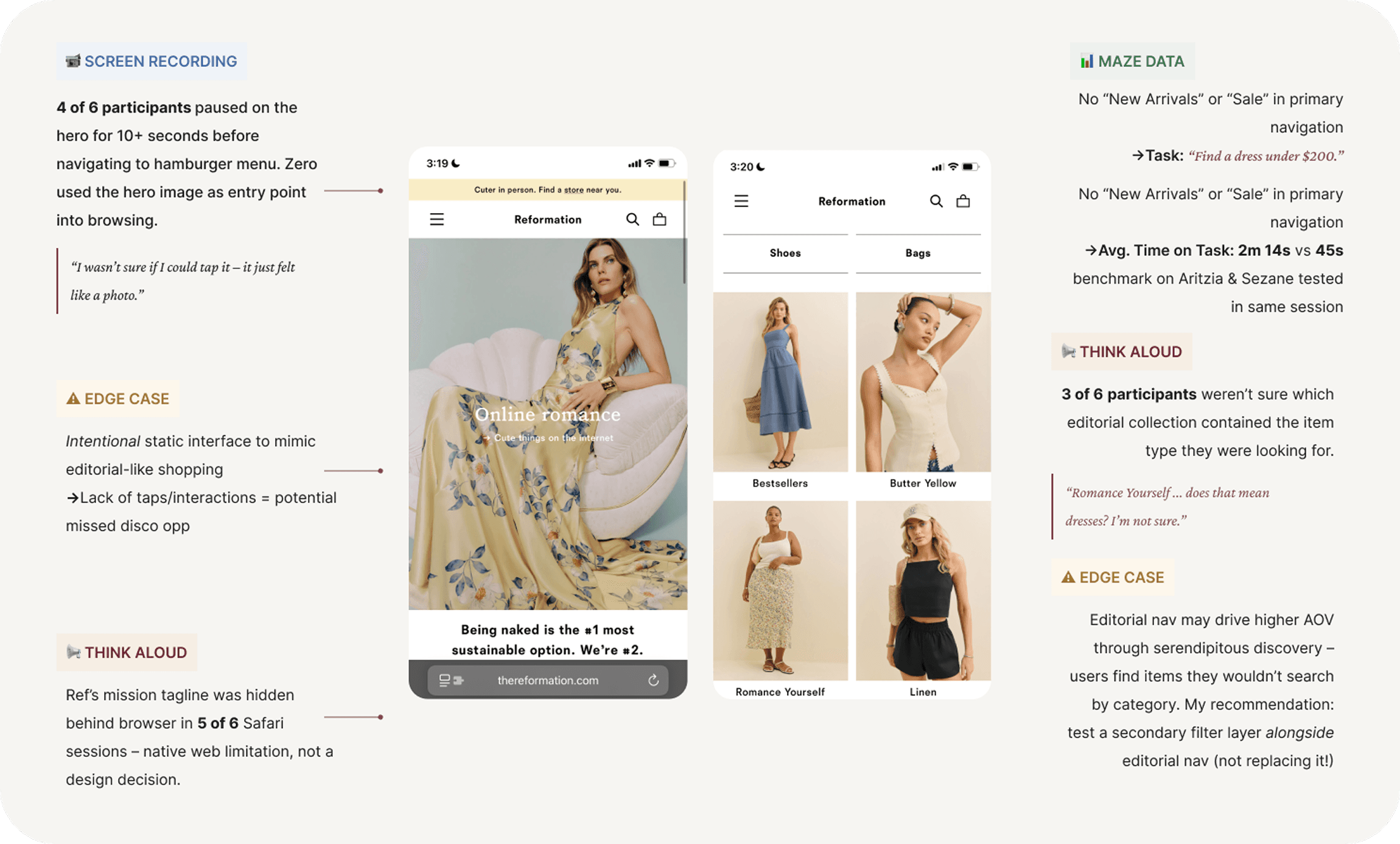
In order to develop effective features for Reformation’s mobile app, I began by closely examining the current mobile browser experience. This helped me identify key areas where the interface experiences the most friction with its users — from laggy performance to limited interactivity — and highlighted opportunities to extend and refine the experience for a dedicated app. From examining Ref's current mobile experience, I identified key friction points before juxtaposing with fellow competitor apps.

Exploring the Competition 🕵🏻‍‍️‍️ ️
& Finding Common Features

As I pored over some of the most popular shopping apps that are on par with Reformation’s style and shopper demographic, I noticed certain features that completely leveled the game with online shopping. So, with pen in hand, I check marked which features would incorporate intuitive functionality without missing Ref’s quintessential ethos.

User Surveys 📊

Surveys captured insights from 16 participants about their experiences browsing (mobile vs web), product discovery, purchasing (in-person vs online), post-purchase behavior (returns, customer support), which informed the following in-depth interview questions.

I found strong alignment in how users discover products – most relied on curated collections, new arrivals, and social inspiration – but notable differences emerged during the decision and purchase phases. Some participants preferred browsing online but completing purchases in-store to assess fit and fabric, while others relied heavily on reviews via influencers.

& Respective Findings
Notable Insights:

"Browsing feels enjoyable when I don't have to overthink about where I want to save my items or digging through my settings for specific features. Everything is just there."

"Saved items remind me that if I still want it now, and not just then, I should definitely get it."


Brand Awareness 📣
  • Over 90% of participants have previously shopped at Reformation or own an item from the company

  • Over 80% of participants report exposure to Reformation via social media platforms, notably Instagram and TikTok


Platform Usage 📱
  • 81% of participants primarily browse Reformation on mobile app

  • 88% strongly request launch of mobile app


Shopping Behavior 🛍️
  • 72% of participants said saved items help them shop more intentionally

  • 58% of participants wish they could organize saved items into multiple wishlists

  • 63% of participants reported purchasing at least one item from saved items

  • Majority of the participants listed quality and price as the two most common deciding factors in purchasing apparel from Ref

  • 64% of participants rely on reviews (via social media) to inform purchase decision due to Ref's lack of review section

  • Participants listed top three most desirable features to improve shopping as reviews, saved lists, and easy returns/order history


Sustainability Measures 🌱
  • Participants listed the top three most important sustainability measures are sourcing of fabric, longevity of fabric, and transparency in metrics


Reason for Non-Purchase 🚫
  • 44% of participants listed uncertainty around sizing (and having to visit a physical location) as primary reason for abandoning cart

  • 70% of participants listed the most common hesitancy/reason to not purchase was due to lack of reviews and price point


Post-Purchase Behavior 📦
  • Over 60% of participants have returned Ref item, with 80% via mail/online and only 20% in-store

  • 88% of participants expect easy access to order history and live tracking

  • 38% of participants have reached out to customer support (RefLove) about purchase

  • 62% of participants expressed frustration in finding order history

  • 31% of participants experienced dissatisfaction with slow tracking updates

  • The biggest reason for returns is due to sizing inconsistency


User Interviews 🗒️

I conducted user interviews with 6 participants who have shopped at Reformation as well as adjacent, apparel lines (Aritzia, Sezane, Madewell, COS, etc). The long-form interviews helped reveal each participant's motivations and pain points when shopping online and helped lay the foundation for my user persona.

& Respective Findings
Affinity Diagram

Define 💭

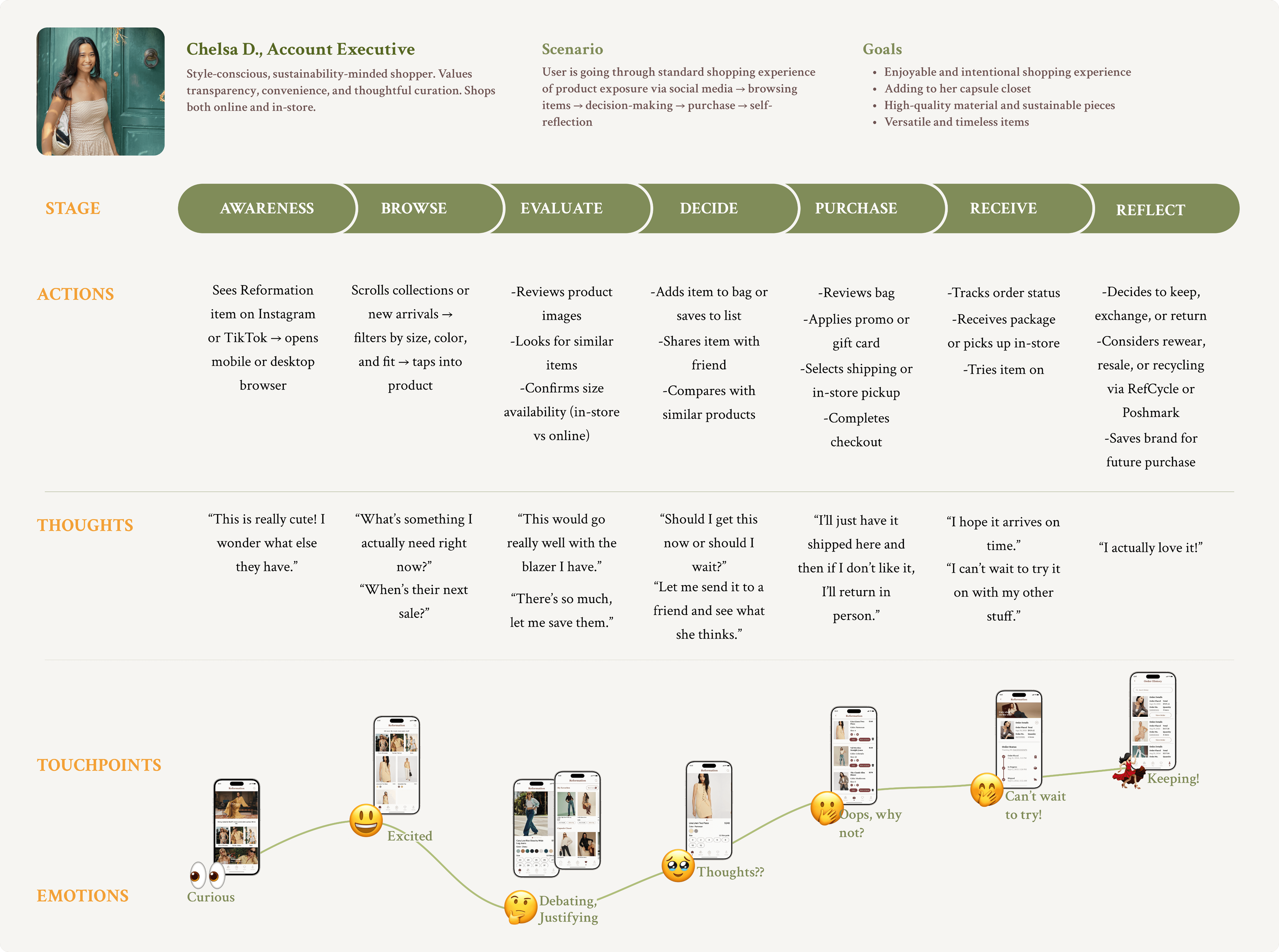
User Persona
Understanding & Implementing User Insights

One of the most important aspects of research is understanding and personalizing user needs to enhance and streamline their shopping experience. By identifying user behavior and pain points, I could avoid common pitfalls and design a beautiful, intuitive, and immersive experience – one that keeps users engaged and skips any buyer’s remorse.


Card Sorting

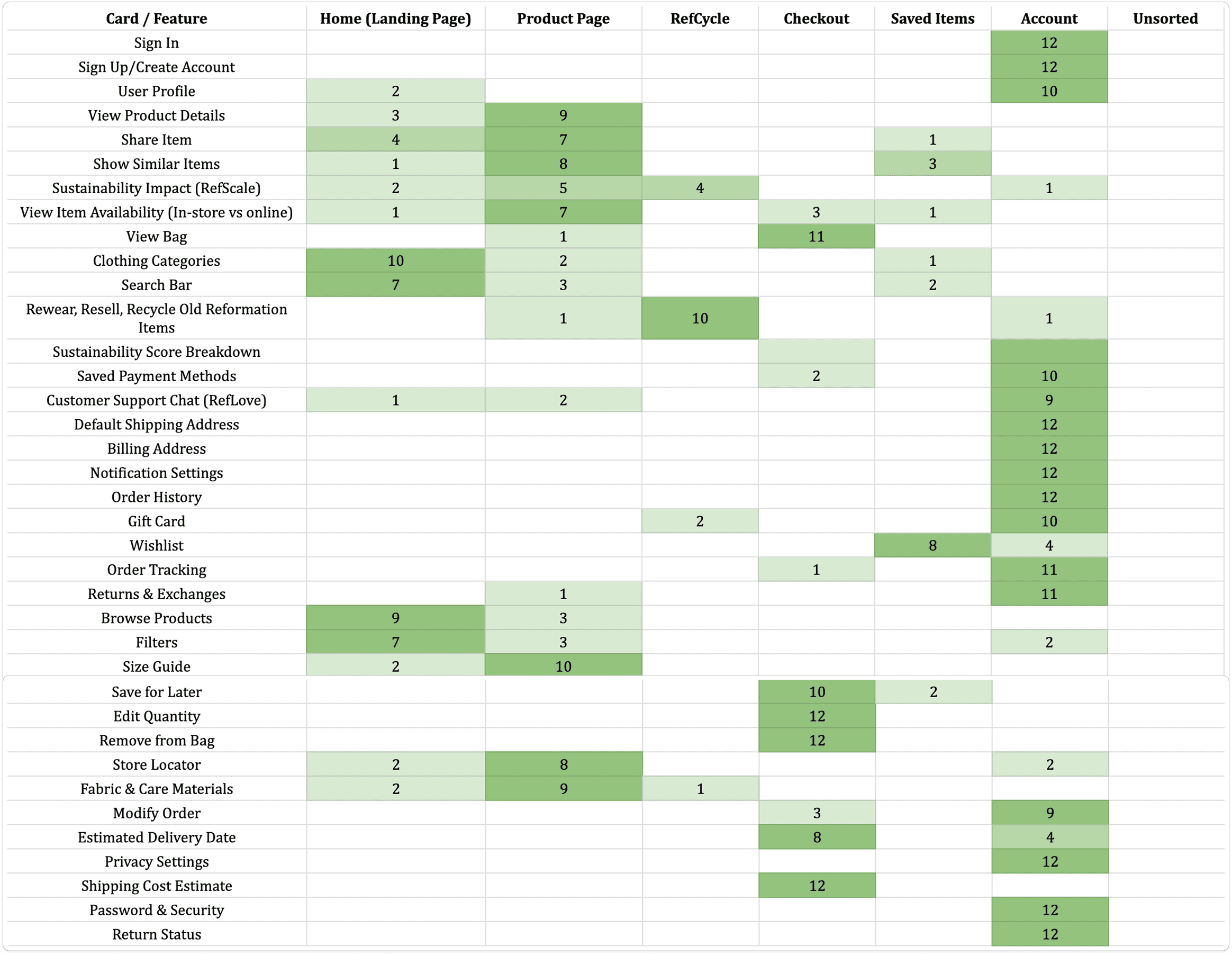
I conducted a closed card sorting with 12 participants, asking them to organize 37 cards into 7 predefined categories. Most participants grouped the cards in ways consistent with familiar mobile clothing app patterns, which provided a strong foundation for the sitemap and overall information architecture.


Information Architecture & Site Map
'Beginning with the End in Mind'

I created a site map of the overall layout of Ref's mobile app to help crystallize the necessary features and navigation which would serve as the groundwork during the design process.

Ideation 💡🎨

Sketches & Wireframes 🖊️
From Pen & Paper to Digital Mock Ups

Pen to paper sketches were the best way for me to ground my designs and then use as a springboard once I was able to convert them into wireframes and prototypes. From there, I iterated directly on the prototypes.

UI Design Guide & Color Palette 🎨
Not So Black-&-White

For the typography, I selected SF Pro Display, Crimson Pro, and Georgia to reflect a balance between modern minimalism and classic elegance. For the text color, I chose a deep burnished brown with red undertones – rich enough to feel warm and timeless, yet subtle enough to complement Reformation’s capsule wardrobe aesthetic across all seasons. The muted tone ensures that key content remains visually prominent without overpowering the overall palette, allowing other elements on the page to harmonize.

For the color palette, I selected a range of beiges, off-whites, grays, and blacks designed to harmonize effortlessly with the soft versatility of pastels.

Lastly, the component library was built out to ensure efficiency and scalability across the app. Each component was thoughtfully designed to anchor Ref’s brand identity of minimalism and timelessness. Unlike generic UI kits, this library was tailored specifically to Ref’s tone and audience, reinforcing the feeling of elevated, conscious shopping. This is especially evident in the pastel hues that complement the deep, burnish red text, creating an aesthetic and clean visual language.


Then Comes Mid-to-Hi-fi Wireframes

Translating my sketches into wireframes showed me how feasible some of my initial sketches are and allowed me to revise any ideas before moving forward with the prototyping process.


Develop & Launch 🎨 🚀

The Beta-Testing Phase
Hi-Fidelity Prototypes

After countless iterations, initial sketches and wireframes finally took shape as high-fidelity prototypes. Yet, as with every step in the design process, this milestone marked not an ending but a new beginning. The summit of one mountain became the base of another—I knew I wasn’t finished. With fresh eyes and deeper insight, I continued to revisit the drawing board, refining and reworking earlier designs to push the experience further and ensure every detail aligned with Reformation’s standard of elegance and functionality.

Usability Testing🥼

Using Maze, I conducted a usability test between Reformation's current mobile browser and my 1.0 Prototype to understand which flows yieled the highest completion rate, why certain tasks were inaccessible or incomplete, and to weed out any friction points. Additionally, I wanted to see how engaged users were on the mobile browser versus my prototype, which would guide me on the iterations for the final prototype.

Key Insights from Usability Testing

  • Engagement increased by 48%, with users staying on the mobile prototype an average 2 minutes longer

  • Order completion occured 3 minutes faster

  • All participants were able to navigate to Order History with minimal confusion compared to mobile browser

  • Users felt most excited upon finding Reformation on their discovery pages, usually Instagram or Tiktok.

  • Decision hesitation often occurred when comparing similar items without side-by-side context.

  • Post-purchase features (returns, RefCycle, and RefLove) increased trust, even when users didn’t use them immediately.

How These Insights Informed the Final Prototype

  • Enhanced product detail hierarchy

  • Incorporate more detailed product information (material & care, sustainability impact)

  • Improved saved items & comparison flows (incorporated wishlists and curated recommendations)

  • Clearer post-purchase pathways


Refined End-to-End Journey (Post-Testing)

Optimize 🎯

The Final Iteration 🎬

This final iteration incorporated user feedback from the second round of usability testing and also reflects my continuous pursuit of refinement, where each tweak was driven by intention and a desire to elevate the user experience without compromising Reformation’s brand essence.

Click to try app prototype! 📱